
A top-up gives one Category Budget extra room for the current month without changing its normal monthly limit. It is useful when you receive extra income, get reimbursed, or decide that a specific category needs more flexibility this month.
Top-ups do not move real money between bank accounts. They only adjust the budget limit inside MoneyCoach.
What a top-up does
When you top up a Category Budget, MoneyCoach adds that amount to the budget's effective limit for the current month.
For example, if your Food budget is 400 and you add a 50 top-up, the budget can show an effective current-month limit of 450. Next month, the budget returns to its normal limit unless another top-up, transfer, rollover, or adjustment applies.
Step-by-step guide
- Open Budgets.
- Make sure you are viewing Categories.
- Find the Category Budget you want to adjust.
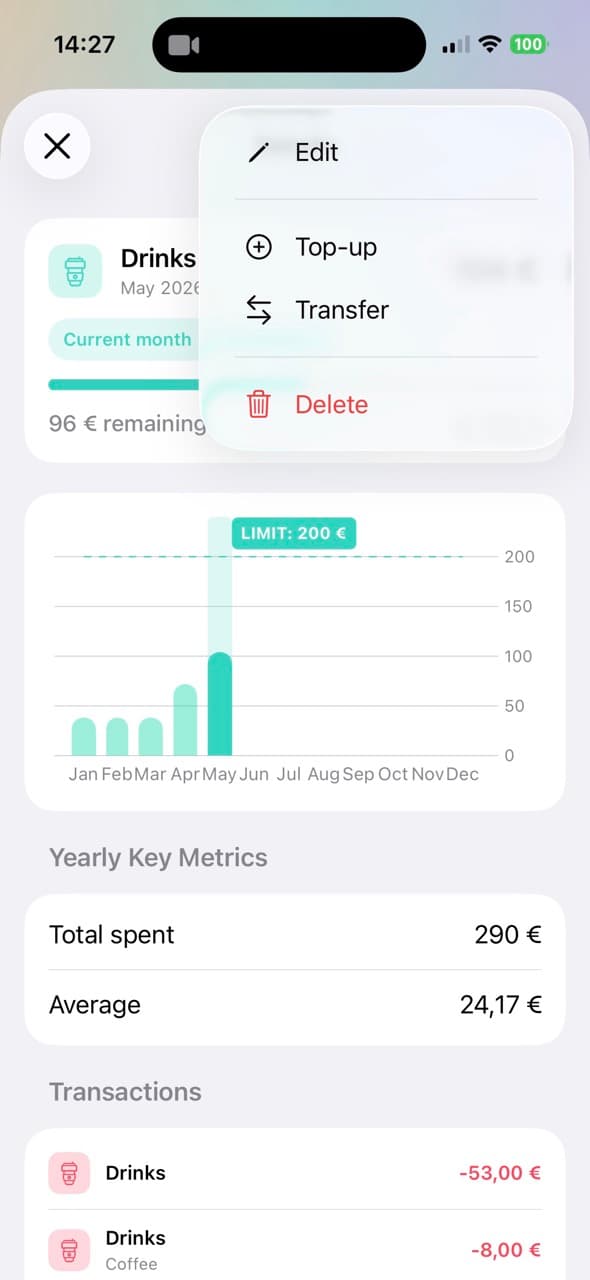
- Open the budget's More menu.
- Tap Top-up.
- Review Available This Month.
- Enter the extra amount in Top-up.
- Tap Done.
You can also open a budget's details, tap the More menu, and choose Top-up from there.
How MoneyCoach calculates available income
The Available This Month section is calculated from this month's income minus any top-ups already allocated to other budgets.
This keeps top-ups tied to actual monthly income instead of turning them into unlimited extra budget. If the amount you enter is higher than the available monthly income, MoneyCoach warns you and the top-up cannot be applied.
Top-up history
The Top-up History section shows top-ups already added to that budget for the current month. You can delete a top-up from this list if you added it by mistake or want to free that income for another budget.
Deleting a top-up removes that current-month adjustment and refreshes the available income calculation.
When to use top-up
Use a top-up when the extra budget should come from this month's income and should not permanently change the budget.
Good examples include a one-time bonus, a reimbursement, a gift, or a planned exception for one category. If you want to permanently move budget from one category to another, use budget transfers instead.