Manual-first budgeting
Budgeting app that doesn't connect to your bank (iPhone, iPad and Mac)
MoneyCoach lets you budget without linking a bank account. You can create manual accounts, add expenses quickly, import Apple Pay / Wallet transactions with Shortcuts, import CSV files when needed, and still use budgets, reports, goals, widgets, and Apple Watch support. Bank connections are optional, so you can start privately and stay in control.
No bank connection is required to create your first manual account.
1M+
downloads
MoneyCoach has a large Apple user base.
15,800+
positive ratings
Real user proof from App Store review data used across the site.
2,800+
European banks
Optional online banking is available when manual tracking is not enough.
Short answer
Yes: MoneyCoach is a budgeting app that works without connecting to your bank on iPhone, iPad and Mac, starting from manual accounts and bringing in Apple Pay / Wallet transactions through Shortcuts or CSV files, with read-only European bank sync left optional.
Start with the right fit
Who should use budgeting without bank linking?
You want a budget app that does not require a bank connection to begin.
You prefer reviewing every transaction before it affects your budget.
You pay with Apple Pay and want those Wallet purchases reflected in your budget.
You are moving from spreadsheets, envelopes, or notes into a real app.
You want optional online banking later without making it the starting point.
Best for
- You want to start with manual budgeting before adding any bank connection.
- You want manual tracking with optional Apple Pay, CSV, and bank import later.
- You use cash, cards, multiple currencies, or accounts that do not sync cleanly.
- You want a private Apple-first budget that can grow with your workflow.
Not the best fit if
- You want bank-sync automation to be the main workflow from day one.
- You never want to review or categorize transactions.
- You only need a one-time printable budget sheet.
Decision guide
Manual budgeting vs Apple Pay import vs bank sync
Start privately, then automate the purchases you already make
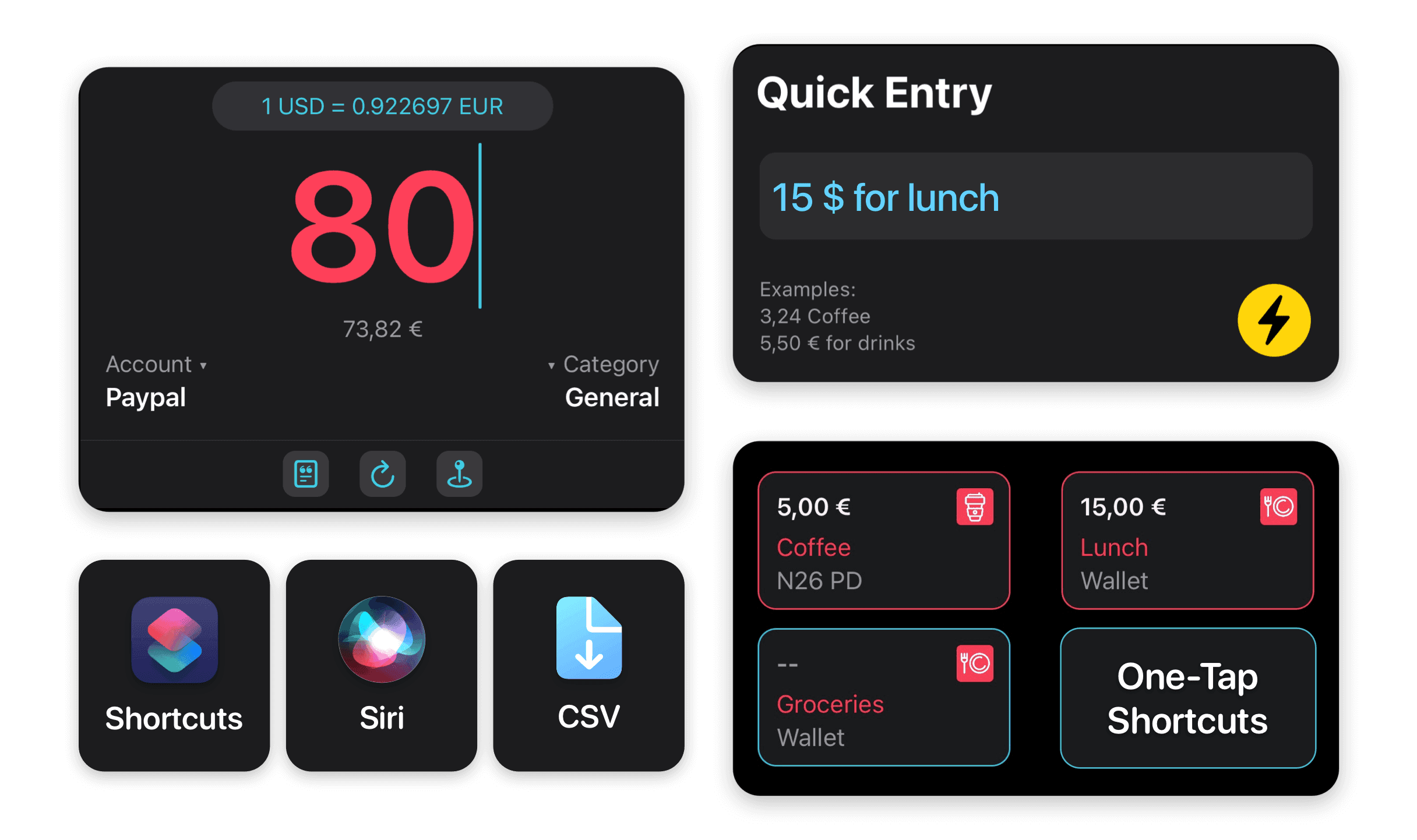
Create a manual account first, add day-to-day spending with Quick Entry, import Apple Pay / Wallet transactions through Shortcuts, and connect supported European banks later only for the accounts where automation saves time.
Comparison
No-bank budget app comparison
No-bank budgeting pages usually compete on privacy and simplicity. MoneyCoach adds a stronger Apple workflow: manual entry, Apple Pay import, CSV import, reports, goals, widgets, Apple Watch, and optional bank sync later.
| Option | Best use case | Tradeoff |
|---|---|---|
| MoneyCoach | Apple users who want manual control plus optional imports. | More powerful than a simple list, so start with one account. |
| Koody-style no-bank apps | Manual-first budgeting without connecting a bank account. | Usually less Apple-specific device depth. |
| Fudget-style monthly apps | Very simple monthly plans. | Less complete for reports, goals, credit cards, and subscriptions. |
| Spreadsheet | Maximum flexibility and ownership. | High maintenance and easier to abandon. |
| Bank-sync-first apps | Automatic transaction capture. | Starts with the trust and reliability problem some users are trying to avoid. |
MoneyCoach workflow
How MoneyCoach helps without a bank connection
- Create manual checking, cash, credit card, savings, and loan accounts.
- Add expenses quickly with Quick Entry, widgets, Shortcuts, or Apple Watch.
- Import eligible Apple Pay / Wallet transactions using a Shortcuts automation.
- Import CSV files when you want bulk transaction history.
- Use Category Budgets, goals, reports, and multi-device sync across Apple devices.
- Connect 2,800+ European bank accounts later if automatic imports become useful.
When optional online banking still helps
Manual tracking is best for control, but automation can lower the effort for purchases you already make with Apple Pay or high-volume bank accounts.
A hybrid workflow works well: track cash manually, import Apple Pay / Wallet purchases automatically, import CSV files monthly, and connect only the accounts you want automated.
MoneyCoach uses read-only online banking access for supported European banks, so connected accounts do not need to replace manual accounts.
★★★★★This app ROCKS
“So many money management apps require linking your bank accounts… I LOVE that MoneyCoach makes it optional.”
- Appman201287, App Store review
United States
Next steps
Related MoneyCoach guides and features
Use these pages to move from research into a practical MoneyCoach setup.
Common concerns
Questions people ask before switching
Will manual tracking take too much effort?
Start with one spending account and one category budget. Quick Entry, widgets, Apple Watch, Apple Pay import, and CSV import reduce repeat typing without forcing bank sync.
Can I still import data later?
Yes. MoneyCoach supports CSV import and optional read-only European online banking, so private manual setup does not trap you in manual entry forever.
Does Apple Pay import mean bank linking?
No. Eligible Wallet transactions can be imported through Shortcuts, which gives Apple Pay users a lighter automation path before any bank connection.
What if my bank connection is unreliable?
You can keep manual accounts, CSV imports, and Apple Pay workflows as fallbacks instead of making the whole budget depend on one bank API.
Search context used for this guide
Budgeting app that doesn't connect to your bank (iPhone, iPad and Mac) FAQ
Can I use MoneyCoach without connecting my bank?
Yes. MoneyCoach supports manual accounts, manual transaction entry, CSV import, budgets, reports, and goals without requiring a bank connection.
Does MoneyCoach work with Apple Pay without bank linking?
Yes. You can use MoneyCoach with manual accounts and import eligible Apple Pay / Wallet transactions through a Shortcuts automation, so Apple Pay spending can flow into your budget without starting from a bank connection.
How does Apple Pay integration fit with manual budgeting?
Apple Pay import reduces the effort for repeat card purchases while keeping the manual budgeting mindset. You still decide which accounts, categories, and budgets matter, but Wallet purchases can be added with less typing.
Can I connect a bank later?
Yes. You can start manually and connect supported European bank accounts later if automatic imports become useful for your workflow.
Is manual budgeting slower than bank sync?
Manual budgeting takes more intention, but many users prefer the control. Quick Entry, widgets, Shortcuts, Apple Watch, Apple Pay / Wallet import, and CSV import reduce the effort.
What is the easiest way to start if I do not trust bank-sync budgeting yet?
Start with one manual spending account and one monthly category budget. That keeps the first step small, gives you an immediate win, and lets you add Apple Pay import, CSV import, or bank sync later only where they remove real work.
Can I mix cash, Apple Pay, CSV imports, and bank connections?
Yes. MoneyCoach is built for mixed workflows. You can track cash manually, import Apple Pay / Wallet purchases through Shortcuts, bring in CSV history, and connect supported European banks for selected accounts.
Will Apple Pay import replace reviewing my spending?
No. The point is to reduce repetitive entry, not to put the budget on autopilot. You can still review categories, budgets, reports, and goals so spending decisions stay visible.
Start without connecting a bank account
Create a private MoneyCoach budget with one manual account, then add Apple Pay import, CSV files, or optional bank sync only when each one earns its place.
MoneyCoach UG, Berlin. Learn more at About Us or contact support at info@moneycoach.ai.