Best for Apple-first budgeting
Best Budgeting App for iPhone
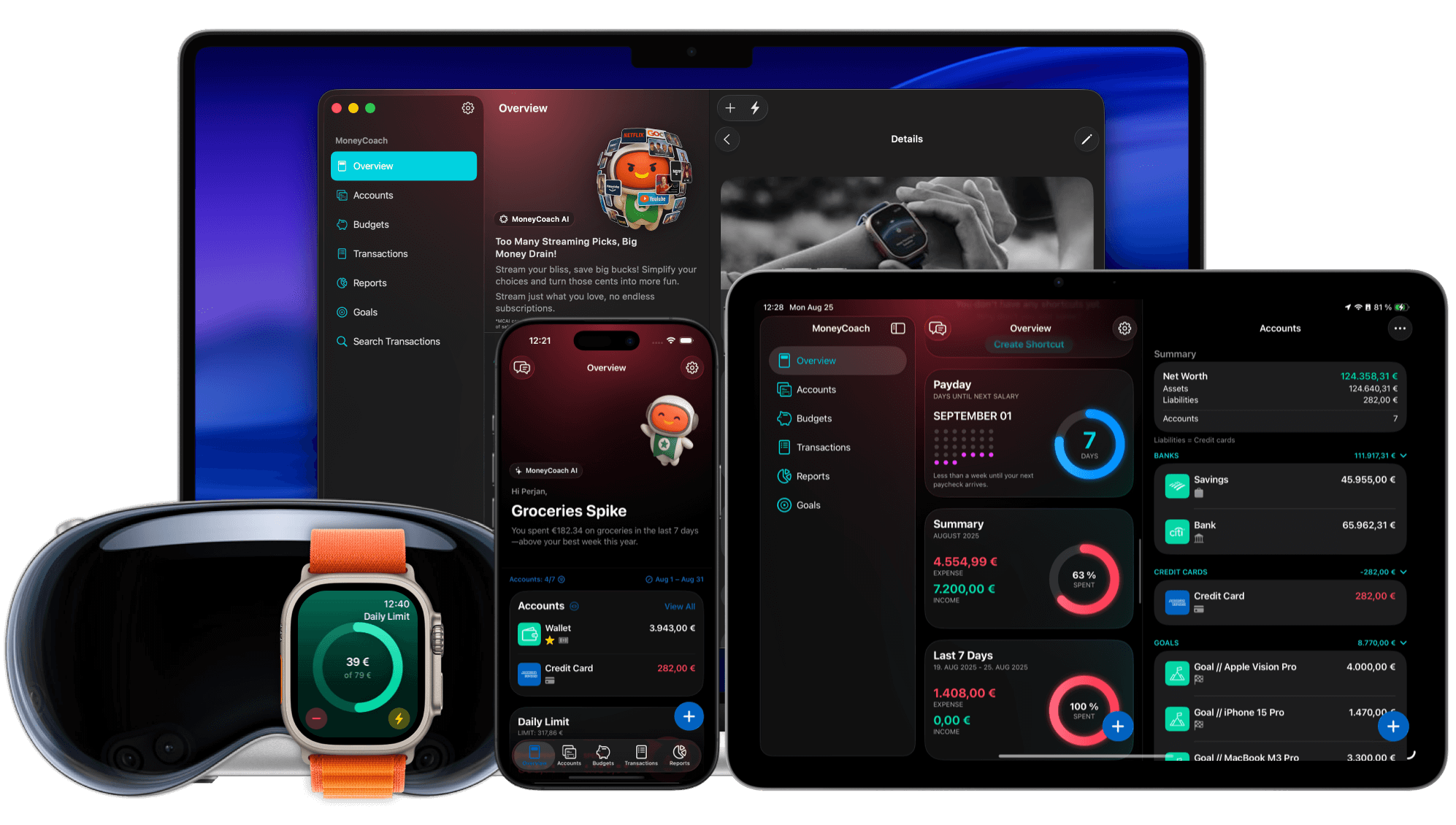
MoneyCoach is a strong budgeting app for iPhone if you want Apple-native budgeting, manual control, Apple Pay / Wallet import, Category Budgets, reports, and family sharing without being forced into bank sync. It is especially useful for iPhone users who also use iPad, Mac, Apple Watch, or Apple Vision Pro.
Best if you want an Apple-native budget that can start manual and grow into a full workflow.
App Store
featured by Apple
MoneyCoach has been featured as App of the Day, in Apple editorial placements, WWDC keynotes, and an App Store Developer Story.
1M+
downloads
A mature iPhone budgeting app with a large user base.
15,800+
positive ratings
Social proof from App Store review data used across the site.
5
Apple platforms
iPhone, iPad, Mac, Apple Watch, and Apple Vision Pro.
Short answer
MoneyCoach is a strong budgeting app for iPhone users who want Apple-native budgeting, manual control, optional Apple Pay and CSV imports, reports, goals, Family Sync, and support across iPad, Mac, Apple Watch, and Vision Pro.
Start with the right fit
Who MoneyCoach is best for on iPhone
Apple users who want one budgeting system across iPhone, iPad, Mac, Apple Watch, and Vision Pro.
People who want manual tracking, CSV import, or optional bank connections.
Couples and families who want shared finance visibility.
Users who want budgets, goals, reports, credit cards, and subscriptions in one app.
Best for
- You use iPhone as the center of your money workflow.
- You want manual control plus optional automation.
- You want budgets, goals, reports, subscriptions, and credit cards together.
- You use more than one Apple device.
Not the best fit if
- You want an Android-first budgeting app.
- You want a fully automatic bank dashboard and no budgeting habit.
- You only need a printable monthly budget template.
Decision guide
iPhone budgeting needs
Choose the iPhone workflow that fits today
Start with manual tracking and Category Budgets, then add reports, goals, Family Sync, CSV import, or online banking as your setup matures.
Comparison
Best iPhone budget app comparison
Most iPhone budgeting apps ask users to choose between simplicity, bank sync, and deeper planning. MoneyCoach is strongest for Apple users who want a manual-first app that can still grow into imports, reports, goals, and shared household workflows.
MoneyCoach workflow
How MoneyCoach helps iPhone users budget
- Category Budgets plan spending by real categories and subcategories.
- Quick Entry, widgets, Shortcuts, and Apple Watch reduce tracking friction.
- Apple Pay / Wallet import helps turn eligible card purchases into budget records.
- Reports turn daily entries into monthly insight.
- Family Sync supports shared budgeting with a partner or family.
- Optional online banking supports 2,800+ European bank accounts.
Choose another app if...
You want a bank-sync-only app where every account is automated from day one.
You need Android support as your primary platform.
You only want a single-purpose calculator instead of a full personal finance app.
★★★★★I found my financial app!!!
“I have tried just about every financial/ budget app out there. I seldom write reviews, but I encourage you to try it.”
- Sil G, App Store review
United States
Next steps
Related MoneyCoach guides and features
Use these pages to move from research into a practical MoneyCoach setup.
Common concerns
Questions people ask before switching
Is MoneyCoach only for manual tracking?
No. Manual tracking is a strong starting point, but MoneyCoach also supports Apple Pay Wallet import, CSV import, Family Sync, reports, and optional European bank sync.
Can I use it for free?
MoneyCoach has a freemium model. Use the App Store listing for current plan details because availability and pricing can change by country.
What if I already use a spreadsheet?
Keep the spreadsheet for long-range planning if it helps, then use MoneyCoach for day-to-day capture, CSV imports, reports, and monthly Category Budgets.
How should I compare iPhone budgeting apps?
Score each candidate on seven criteria: speed of daily entry, category clarity, weekly review workflow, goal alignment, collaboration options, reporting usefulness, and iPhone-native quality. If your budget keeps slipping, weight entry speed, category clarity, and review workflow highest.
How long should I test before switching?
Run one full monthly cycle with weekly reviews. Enter your regular spending categories, review every seven days, and check whether your top overspend category improves by week three. No measurable behavior change means it is not the right app for you.
Search context used for this guide
Best Budgeting App for iPhone FAQ
What makes a budgeting app good on iPhone?
Fast transaction capture, clear monthly category visibility, useful reminders and review workflows, and reports that highlight trends you can act on. The best app is the one you keep using every week, not the one with the longest feature list.
Should I choose a free or paid budgeting app for iPhone?
Choose based on outcomes, not price alone. A paid app is worth it if it saves more than it costs by improving consistency and reducing overspending. MoneyCoach has a freemium model, so you can test the workflow before deciding.
Is MoneyCoach a good budgeting app for iPhone?
Yes. MoneyCoach is a strong fit for iPhone users who want Apple-native budgeting, manual tracking, Category Budgets, reports, and cross-device support.
Does MoneyCoach work without bank sync on iPhone?
Yes. You can use manual accounts, Quick Entry, CSV import, widgets, and reports without connecting a bank account.
Does MoneyCoach work across Apple devices?
Yes. MoneyCoach supports iPhone, iPad, Mac, Apple Watch, and Apple Vision Pro.
Does MoneyCoach support Apple Pay expense tracking?
Yes. MoneyCoach can work with Apple Pay / Wallet import through Shortcuts for eligible transactions, which helps iPhone users reduce manual typing while keeping budget review intentional.
What should I set up first on iPhone?
Start with one account and one Category Budget. That gives you a fast win, then you can add widgets, Apple Watch, Apple Pay import, CSV import, Family Sync, or online banking when each one solves a real problem.
Is MoneyCoach only useful if I use every feature?
No. MoneyCoach works well as a simple iPhone budget first. The larger feature set matters when your workflow grows across devices, family sharing, imports, reports, goals, or more complex accounts.
Build an iPhone budget that can grow with you
Start with manual tracking and Category Budgets, then add Apple Pay import, CSV history, reports, goals, Family Sync, or bank sync when each one helps.
MoneyCoach UG, Berlin. Learn more at About Us or contact support at info@moneycoach.ai.