Native iPadOS app, not a scaled-up iPhone app
Best budgeting app for iPad — synced with iPhone, Mac and Apple Watch
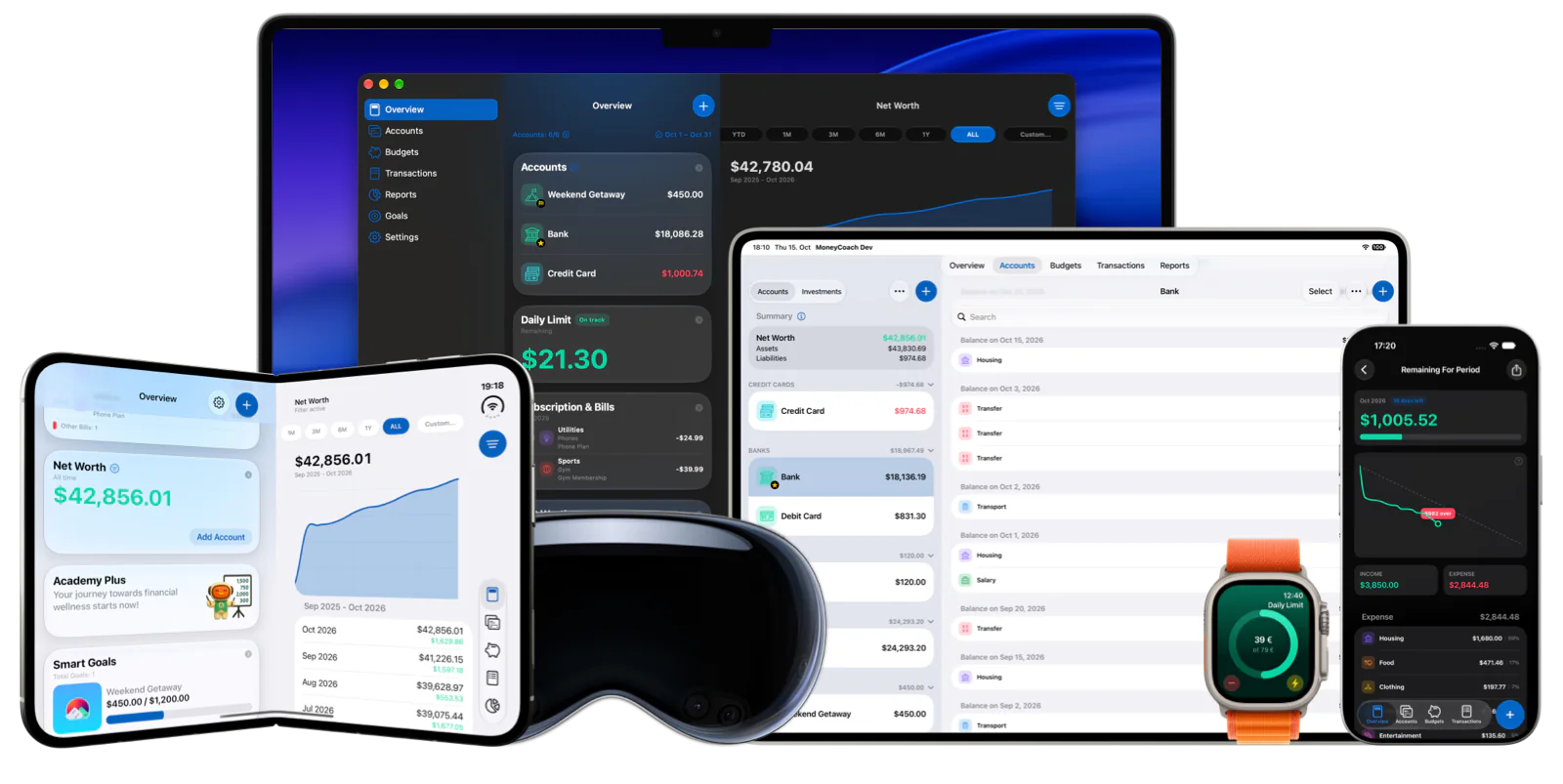
MoneyCoach is a personal finance and budgeting app built as a native iPadOS app. The larger screen gets sidebars for navigation, Split View for working in two areas at once, keyboard shortcuts for entry, and widgets on the Home Screen. Everything you add on iPad syncs through iCloud to the same app on iPhone, Mac, Apple Watch and Apple Vision Pro, so the iPad can be the planning screen while the iPhone stays the capture device.
Plan and review on iPad, capture spending on iPhone and Apple Watch. The same App Store download runs on every Apple device.
App Store
featured by Apple
MoneyCoach has been featured as App of the Day, in Apple editorial placements, WWDC keynotes, and an App Store Developer Story.
iPadOS 26
Day 1 support
MoneyCoach 11 shipped for iPadOS 26 on release day with the Liquid Glass redesign.
5 devices
one iCloud sync
iPad, iPhone, Mac, Apple Watch and Apple Vision Pro share the same data.
2,800+
European banks
Optional read-only bank sync across 30 European countries.
Short answer
MoneyCoach is a money management and budgeting app that runs as a native app on iPad, with Split View, sidebars, keyboard shortcuts, widgets and MoneyCoach AI on M1 iPads or later. It syncs through iCloud with iPhone, Mac, Apple Watch and Apple Vision Pro, imports Apple Pay and Apple Card transactions, and offers optional read-only bank sync for 2,800+ European banks. It is free to download with a Premium tier.
Start with the right fit
Who MoneyCoach for iPad is for
You plan monthly budgets and read reports and want more room than an iPhone screen.
You already use MoneyCoach on iPhone, Mac or Apple Watch and want the same data on iPad.
You clean up CSV imports, Apple Card statements or bank-synced transactions in batches.
You want a native iPadOS app with widgets and App Lock instead of a browser tab.
Best for
- You want to plan budgets and read reports on a bigger screen than your iPhone.
- You already use an iPhone, Mac or Apple Watch and want one budget across all of them.
- You want Split View, sidebars and a hardware keyboard to work for you, not against you.
- You want a native iPadOS app instead of a web dashboard in Safari.
Not the best fit if
- You use Android or Windows alongside iPad. MoneyCoach is Apple-only.
- You need to start a US bank connection directly on iPad. Supported US Plaid connections must be started on iPhone; Canadian bank linking is coming soon.
- You want Apple Pencil-specific features such as handwriting entry. MoneyCoach has none.
Decision guide
iPad budgeting workflows
Use the iPad for the review, the iPhone for the capture
Open Reports in Split View next to Transactions, fix categories with a keyboard, set next month’s Category Budgets, and let iCloud sync carry the result to every other device.
Comparison
MoneyCoach on iPad compared with other kinds of budgeting apps
Most "iPad budgeting apps" are either a web dashboard opened in Safari or an iPhone app stretched to fill the screen. The table shows what a native iPadOS app changes.
| Option | What you get on iPad | Tradeoff |
|---|---|---|
| MoneyCoach (native iPadOS app) | Sidebars, Split View, keyboard shortcuts, Home Screen widgets, App Lock, iCloud sync to iPhone, Mac, Apple Watch and Vision Pro. | Apple devices only. US Plaid connections start on iPhone; Canadian bank linking is coming soon. |
| Web-only budgeting apps | The same browser dashboard as on a laptop, opened in Safari on iPad. | No widgets, no Split View-aware layouts, no offline access, no Apple Watch companion. Usually needs a bank login to be useful. |
| iPhone-only apps on iPad | The iPhone layout scaled up or shown in a small window. | Wasted screen space, no sidebar or multi-column navigation, often no Mac app to sync with. |
| Spreadsheet on iPad | Full control over structure and formulas. | No categorization, budgets, reminders or reports without building them yourself; harder to update from iPhone. |
MoneyCoach workflow
What MoneyCoach does on iPad
- Native iPadOS app with sidebars in most screens for faster navigation between accounts, budgets, reports and settings.
- Split View support that keeps selection, filters and navigation state across Accounts, Reports, Overview and Transactions (improved in MoneyCoach 11.5).
- Keyboard shortcuts to add expenses, income and transfers when a hardware keyboard is connected.
- Home Screen widgets and interactive widgets for remaining budget, goals, net worth and upcoming bills.
- iCloud sync with iPhone, Mac, Apple Watch and Apple Vision Pro, protected with end-to-end encryption.
- MoneyCoach AI insights on the Overview for iPads with M1 chips or later.
- Apple Pay / Wallet import via Shortcuts, Apple Card CSV import and generic CSV import for history.
- Optional read-only bank sync for 2,800+ banks across 30 European countries.
- App Lock that covers the entire window, including open sheets, until you authenticate.
- Day 1 support for iPadOS 26 with the Liquid Glass redesign.
When iPad is not the main workflow
Use iPhone for on-the-spot expense capture with Quick Entry, Control Center shortcuts and interactive widgets.
Use Apple Watch for glanceable balances and complications, not for review sessions.
Use Mac when you want a menu bar, Touch Bar support and desktop-class context menus for heavy cleanup.
Use iPad for the weekly or monthly review where Split View, sidebars and reports pay off.
★★★★★Great, great app!
“Money coach is simple to use but powerful at the same time. I can manage my bank account in different countries using different currencies and generating really useful reports!”
- Andresantosfx, App Store review
Australia
Next steps
Related MoneyCoach guides and features
Use these pages to move from research into a practical MoneyCoach setup.
Common concerns
Questions people ask before switching
Is this a real iPad app or a scaled iPhone app?
A real one. MoneyCoach ships a native iPadOS build with sidebars in most screens and Split View support that keeps your selection, filters and navigation state as you move between Accounts, Reports, Overview and Transactions. It launched on Day 1 for iPadOS 26.
Will I have to enter everything twice on iPad and iPhone?
No. Turn on iCloud sync once and the same accounts, budgets, goals and transactions appear on iPad, iPhone, Mac, Apple Watch and Apple Vision Pro.
Does bank sync work in my country?
MoneyCoach bank sync connects 2,800+ banks across 30 European countries with read-only access. Supported US banks also connect through Plaid, starting on iPhone. Canadian bank linking is coming soon. Manual entry and imports remain available.
Is it free?
MoneyCoach is free to download and starts with a free trial. After the trial, you choose Premium or Premium Max. Check the App Store listing for current prices, because they vary by country.
Best budgeting app for iPad — synced with iPhone, Mac and Apple Watch FAQ
Is MoneyCoach a real iPad app or a scaled-up iPhone app?
A native iPadOS app. It uses sidebars in most screens, supports Split View with preserved selection and filters, and shipped on Day 1 for iPadOS 26. It is not the iPhone layout stretched to fill the screen.
Does MoneyCoach on iPad sync with iPhone and Mac?
Yes. Turn on iCloud sync and the same accounts, budgets, goals and transactions appear on iPad, iPhone, Mac, Apple Watch and Apple Vision Pro. Sync is protected with end-to-end encryption.
Does MoneyCoach support Split View and Stage Manager on iPad?
Split View is supported and was improved in MoneyCoach 11.5 so Accounts, Reports, Overview and Transactions keep their state as you move around. As a native iPadOS app it runs inside the multitasking features iPadOS provides; MoneyCoach does not advertise Stage Manager-specific behavior beyond that.
Can I use Apple Pencil with MoneyCoach?
You can use Apple Pencil to tap and navigate like any iPad app, but MoneyCoach has no Pencil-specific features such as handwriting entry. Entry is designed for touch, keyboard shortcuts, Quick Entry and imports.
Does bank sync work on iPad?
Yes, for European banks. MoneyCoach connects 2,800+ banks across 30 European countries with read-only access, and connected accounts sync to every device. Supported US banks also connect through Plaid, starting on iPhone. Canadian bank linking is coming soon. Manual entry and imports remain available.
Is MoneyCoach free on iPad?
MoneyCoach is free to download and starts with a free trial. The same App Store download runs on iPad, iPhone, Mac, Apple Watch and Apple Vision Pro. After the trial, you choose Premium or Premium Max; check the App Store listing for current prices, because pricing varies by country.
Does MoneyCoach AI work on iPad?
Yes, on iPads with an M1 chip or later, which is the same requirement as Apple Intelligence. MoneyCoach AI appears at the top of the Overview and gives insights based on your own data.
Make iPad your budgeting desk
Download MoneyCoach, turn on iCloud sync, and use the iPad for budgets, reports and cleanup while the iPhone and Apple Watch handle daily capture.
MoneyCoach UG, Berlin. Learn more at About Us or contact support at info@moneycoach.ai.