Money management on visionOS
The personal finance app on Apple Vision Pro
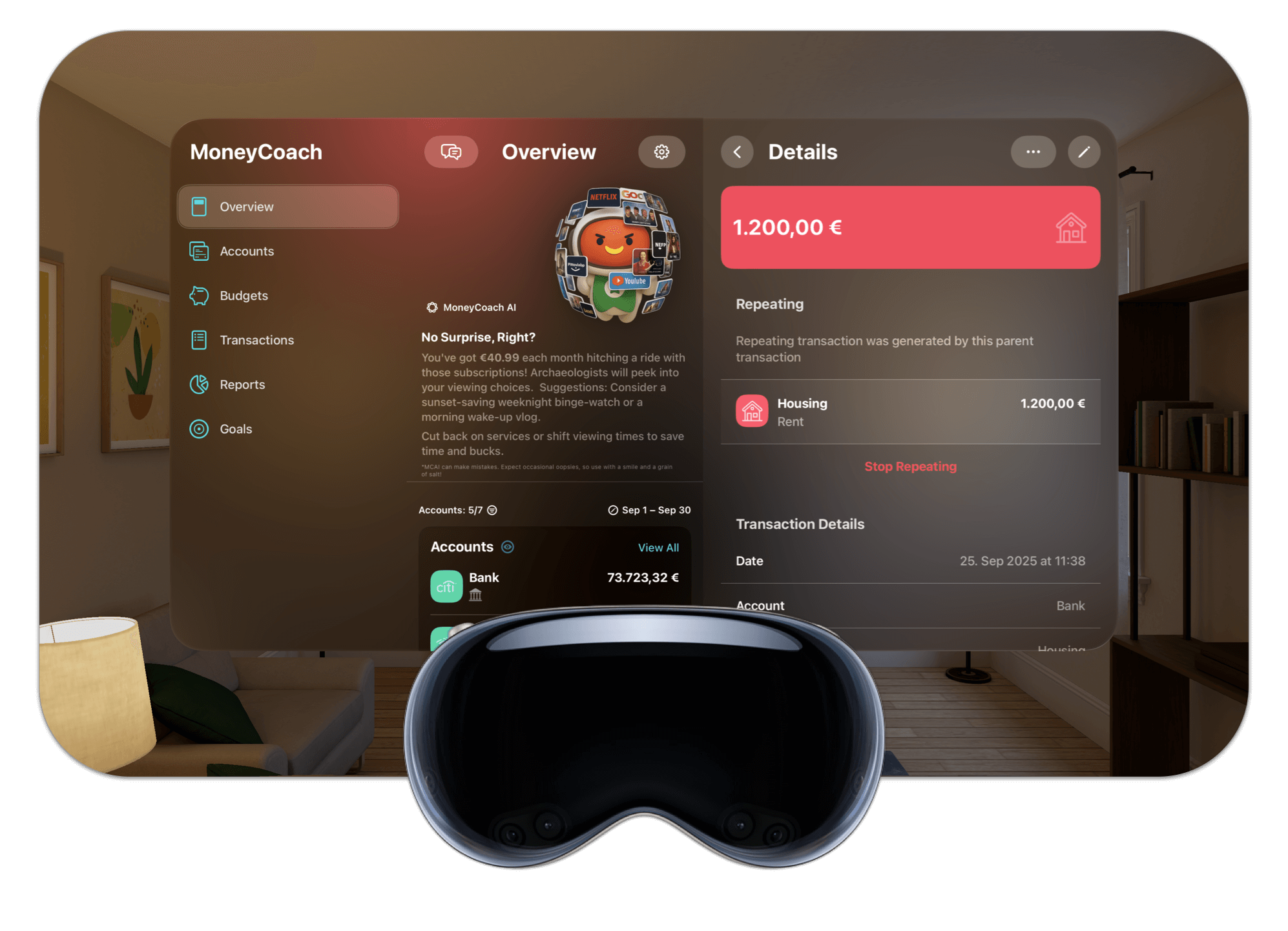
MoneyCoach runs as a visionOS app on Apple Vision Pro, not as a phone app in a compatibility window. Place your financial overview, budgets, goals and reports in your space, pin Vision Pro widgets to a wall, and keep everything in sync with the MoneyCoach apps for iPhone, iPad, Mac and Apple Watch through iCloud. Bank sync is available for 2,800+ banks across 30 European countries; supported US banks also connect through Plaid, starting on iPhone. Canada is coming soon. Manual entry, CSV and Apple Pay / Wallet import remain available.
One App Store listing covers iPhone, iPad, Mac, Apple Watch and Apple Vision Pro.
App Store
featured by Apple
Apple listed MoneyCoach as a top app for Apple Vision Pro at the European Vision Pro launch in July 2024.
visionOS 26
day-one support
MoneyCoach 11 shipped on release day for iOS 26, iPadOS 26, watchOS 26, macOS 26 and visionOS 26.
Widgets
on Apple Vision Pro
Budget, goal, net worth and upcoming-bills widgets can be placed in your room.
5
Apple platforms
iPhone, iPad, Mac, Apple Watch and Apple Vision Pro share one iCloud-synced dataset.
Short answer
MoneyCoach is a money management and budgeting app with a visionOS version for Apple Vision Pro. Use it to review your financial overview, budgets, goals, net worth and reports in a spatial window, with Vision Pro widgets for a quick glance. Data syncs over iCloud with the iPhone, iPad, Mac and Apple Watch apps. Daily data entry is still fastest on iPhone; Vision Pro is the place for planning and review.
Start with the right fit
Who should use MoneyCoach on Apple Vision Pro?
You own an Apple Vision Pro and want your personal finances in the same space as your other visionOS apps.
You already track money in MoneyCoach on iPhone, iPad, Mac or Apple Watch and want the same budgets and goals on the headset.
You prefer to review budgets and reports on a large, freely placed window instead of a phone screen.
You want a finance app that works without a web dashboard and without a login for local or iCloud-synced data.
You use bank sync in Europe and want the imported transactions available on every Apple device you own.
Best for
- Apple Vision Pro owners who already budget on iPhone, iPad or Mac and want the same data in a larger spatial view.
- Monthly planning sessions: budgets, goals, net worth and the 12 reports on a window you can size and place freely.
- People who want a finance app with no web dashboard and no account login for local or iCloud-synced data.
Not the best fit if
- Entering every transaction on the headset. Quick entry, Apple Pay / Wallet import and Shortcuts live on iPhone.
- Starting a US bank connection directly on Vision Pro. Supported US connections start on iPhone through Plaid. Canada is coming soon; manual entry and CSV import remain available.
Decision guide
MoneyCoach across Apple devices
One budget across every Apple device
Install MoneyCoach once from the App Store. The visionOS app, the iPhone app, the iPad app, the Mac app and the Apple Watch app share one iCloud-synced dataset.
MoneyCoach workflow
What MoneyCoach does on Apple Vision Pro
- Runs as a visionOS app: released on day one for visionOS 26, with screens designed for the Vision Pro window rather than an iPad layout.
- Financial overview: accounts, budgets, goals and net worth in one window you can size and place anywhere in your room.
- Category budgets and goals: check remaining budget and goal progress, the same objects you set up on iPhone or Mac.
- Reports: the 12 MoneyCoach reports, including net worth and spending by category, on a window large enough to read a full month.
- Vision Pro widgets: pin a budget, goal, net worth or upcoming-bills widget to a wall for a quick glance without opening the app.
- iCloud sync: one dataset shared with the iPhone, iPad, Mac and Apple Watch apps, so a transaction added on iPhone shows up on Vision Pro.
- Transactions with descriptions, tags, payees, photo receipts and locations, viewable on Vision Pro.
- Bank sync for 2,800+ banks in 30 European countries: transactions imported on iPhone, iPad or Mac appear on Vision Pro through iCloud.
- Privacy: no web dashboard and no login required for local or iCloud-synced data. A MoneyCoach sign-in is required for bank sync and optional cloud sharing with AI assistants.
When Vision Pro is not the right MoneyCoach device
Data entry is easier on iPhone. Quick entry, Apple Pay / Wallet import through Shortcuts and Live Activities are iPhone features; use Vision Pro for review and planning.
European bank sync uses GoCardless. Supported US Plaid connections start on iPhone; imported data can sync through iCloud. Canadian bank linking is coming soon.
The visionOS App Store is limited to the countries where Apple sells Vision Pro. Check the App Store availability for your region before buying the headset for this use.
iCloud sync is optional. If you keep data local on one device, it will not appear on Vision Pro until you enable iCloud sync in MoneyCoach.
★★★★★Everyday spending feels easier to understand
“It didn't take long to get into the habit of logging every transaction, and I can already see the benefit of having all my transactions recorded.”
- Discotoast, App Store review
United States
Next steps
Related MoneyCoach guides and features
Use these pages to move from research into a practical MoneyCoach setup.
Search context used for this guide
The personal finance app on Apple Vision Pro FAQ
Is MoneyCoach a native visionOS app or an iPad app running on Vision Pro?
MoneyCoach ships a visionOS build. It was released on day one for visionOS 26, has screens designed for the Vision Pro window, supports Vision Pro widgets, and was featured by Apple as a top app for Apple Vision Pro in July 2024.
What can you do with MoneyCoach on Apple Vision Pro?
Review your financial overview, category budgets, goals, net worth and the 12 MoneyCoach reports in a window you can size and place in your space, browse transactions with descriptions, tags, payees, photo receipts and locations, and pin Vision Pro widgets to a wall for a quick glance. Data entry is possible, but faster on iPhone.
Does MoneyCoach on Vision Pro sync with iPhone, iPad, Mac and Apple Watch?
Yes. Turn on iCloud sync in MoneyCoach and the same accounts, budgets, goals and transactions appear on iPhone, iPad, Mac, Apple Watch and Apple Vision Pro. Transactions imported through European bank sync on iPhone, iPad or Mac appear on Vision Pro as well.
Is MoneyCoach for Apple Vision Pro free?
MoneyCoach is a free download with a free trial, then a Premium or Premium Max subscription. The subscription is shared across all your Apple devices, so you do not pay separately for the visionOS app.
How do I install MoneyCoach from the visionOS App Store?
Open the App Store on Apple Vision Pro, search for MoneyCoach, and tap Get. If you already own MoneyCoach on iPhone or Mac with the same Apple ID, it appears under your purchased apps. The visionOS App Store is only available in the countries where Apple sells Vision Pro.
Does bank sync work on Apple Vision Pro?
European bank sync uses GoCardless and can be set up on iPhone, iPad or Mac. Imported transactions then sync to Vision Pro over iCloud. Supported US banks also connect through Plaid, starting on iPhone. Canadian bank linking is coming soon. Manual entry, CSV and Apple Pay / Wallet import remain available.
Do I need an account or login to use MoneyCoach on Vision Pro?
No. MoneyCoach has no web dashboard and stores data on your device or in your iCloud account. A MoneyCoach sign-in is required for bank sync and optional cloud sharing with AI assistants.
Build a budget you can actually keep
MoneyCoach helps you track spending, plan budgets, review reports, and reach goals across the Apple devices you already use.
MoneyCoach UG, Berlin. Learn more at About Us or contact support at info@moneycoach.ai.