Bill tracker app for iPhone
Best Bill Tracker App for iPhone
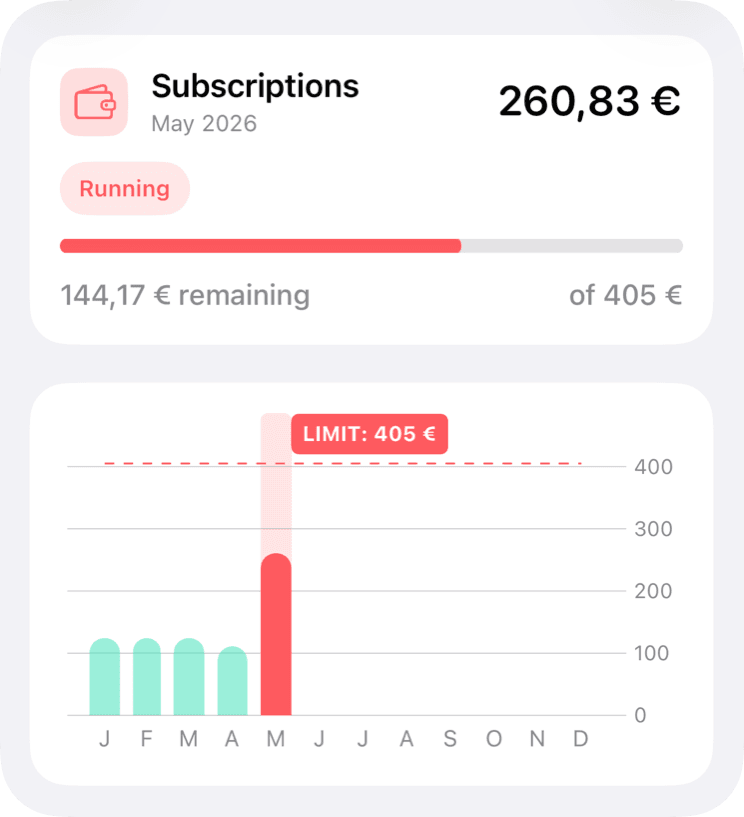
MoneyCoach is a practical bill tracker app for iPhone users who want recurring costs to stop surprising the monthly budget. Track subscriptions, fixed expenses, credit cards, category budgets, and goals together so bills are part of the plan instead of a separate reminder list.
Start with the bills that repeat every month, then add subscriptions and annual renewals.
App Store
featured by Apple
MoneyCoach has been featured as App of the Day, in Apple editorial placements, WWDC keynotes, and an App Store Developer Story.
Category Budgets
monthly limits
Bills can be planned alongside flexible spending.
Reports
history
Recurring costs become visible over time.
Family Sync
sharing
Useful when more than one adult manages household costs.
Short answer
MoneyCoach helps iPhone users manage bills by making recurring costs part of the monthly budget. Rent, utilities, insurance, debt payments, credit cards, subscriptions, and annual renewals can sit beside flexible categories so bills stop surprising the rest of the month.
Start with the right fit
Who MoneyCoach is best for as a bill tracker
You want recurring bills, subscriptions, and budgets in one finance app.
You want to see how fixed costs affect what is left for groceries, transport, goals, and flexible spending.
You manage household expenses with a partner or family.
You want reports and category history, not only due-date reminders.
Best for
- You want fixed bills and flexible spending in one monthly plan.
- You manage recurring costs with a partner or family.
- You want bills connected to reports, subscriptions, goals, and credit cards.
- You need more context than a simple due-date reminder.
Not the best fit if
- You only need push notifications for due dates.
- You do not want to review recurring costs as part of a budget.
Decision guide
Bill manager needs
Turn bills from surprises into planned categories
Group recurring payments, review what is fixed versus flexible, and keep bill decisions connected to the rest of the monthly budget.
Comparison
Bill manager options
| Option | Best for | Limitation |
|---|---|---|
| MoneyCoach | Bills connected to budgets, reports, subscriptions, and goals. | Requires setting up categories or recurring costs. |
| Reminder app | Simple due-date notifications. | Does not show budget impact. |
| Subscription tracker | Streaming, apps, and memberships. | Misses rent, utilities, insurance, and debt context. |
| Spreadsheet | Custom fixed-cost planning. | Harder to maintain from iPhone every month. |
MoneyCoach workflow
How MoneyCoach helps manage bills
- Category Budgets separate fixed bills from flexible spending categories.
- Subscription workflows help review streaming, apps, memberships, and annual renewals.
- Credit card tools help manage delayed spending and card balances.
- Reports show how recurring costs change over time.
- Family Sync can create shared visibility for household bill planning.
When a dedicated bill reminder is enough
If you only need notifications, a simple reminder app may be enough.
MoneyCoach is stronger when bills need to connect with budgets, reports, goals, subscriptions, and shared household decisions.
Start by entering the top recurring bills instead of trying to rebuild every past payment.
★★★★★Fun app
“This app is useful in helping me budget my bills and try to work towards saving money. I like the sorting and the starring features specifically.”
- ams11111, App Store review
United States
Next steps
Related MoneyCoach guides and features
Use these pages to move from research into a practical MoneyCoach setup.
Common concerns
Questions people ask before switching
Is this different from subscription tracking?
Yes. Subscriptions are one part of recurring spending. Bills also include rent, utilities, insurance, debt payments, credit cards, phone, internet, and annual renewals.
Can this work for a household?
Yes. Family Sync, Category Budgets, and reports help more than one person see how fixed costs affect the month.
What should I add first?
Start with the recurring costs that can create real stress if missed: housing, utilities, insurance, debt payments, phone, internet, and active subscriptions.
Search context used for this guide
Best Bill Tracker App for iPhone FAQ
Is MoneyCoach a bill tracker app?
MoneyCoach can track bills as part of a full money workflow: recurring expenses, subscriptions, credit cards, budgets, reports, and goals.
Is a bill manager different from a budget app?
A bill manager focuses on recurring payments. A budget app connects those bills to the rest of the month, which helps decide what can change and what is fixed.
What bills should I add first?
Start with rent or mortgage, utilities, insurance, debt payments, phone, internet, and the subscriptions that renew every month. Add annual renewals after the monthly picture is clear.
Can couples or families use MoneyCoach for bills?
Yes. Family Sync, Category Budgets, and reports can help households keep recurring expenses visible without relying on memory.
Make fixed costs visible before the month gets tight
Add the bills that repeat every month, group them into categories, and review them beside the rest of your MoneyCoach budget.
MoneyCoach UG, Berlin. Learn more at About Us or contact support at info@moneycoach.ai.