Monthly budget planning
Monthly Budget Planner App
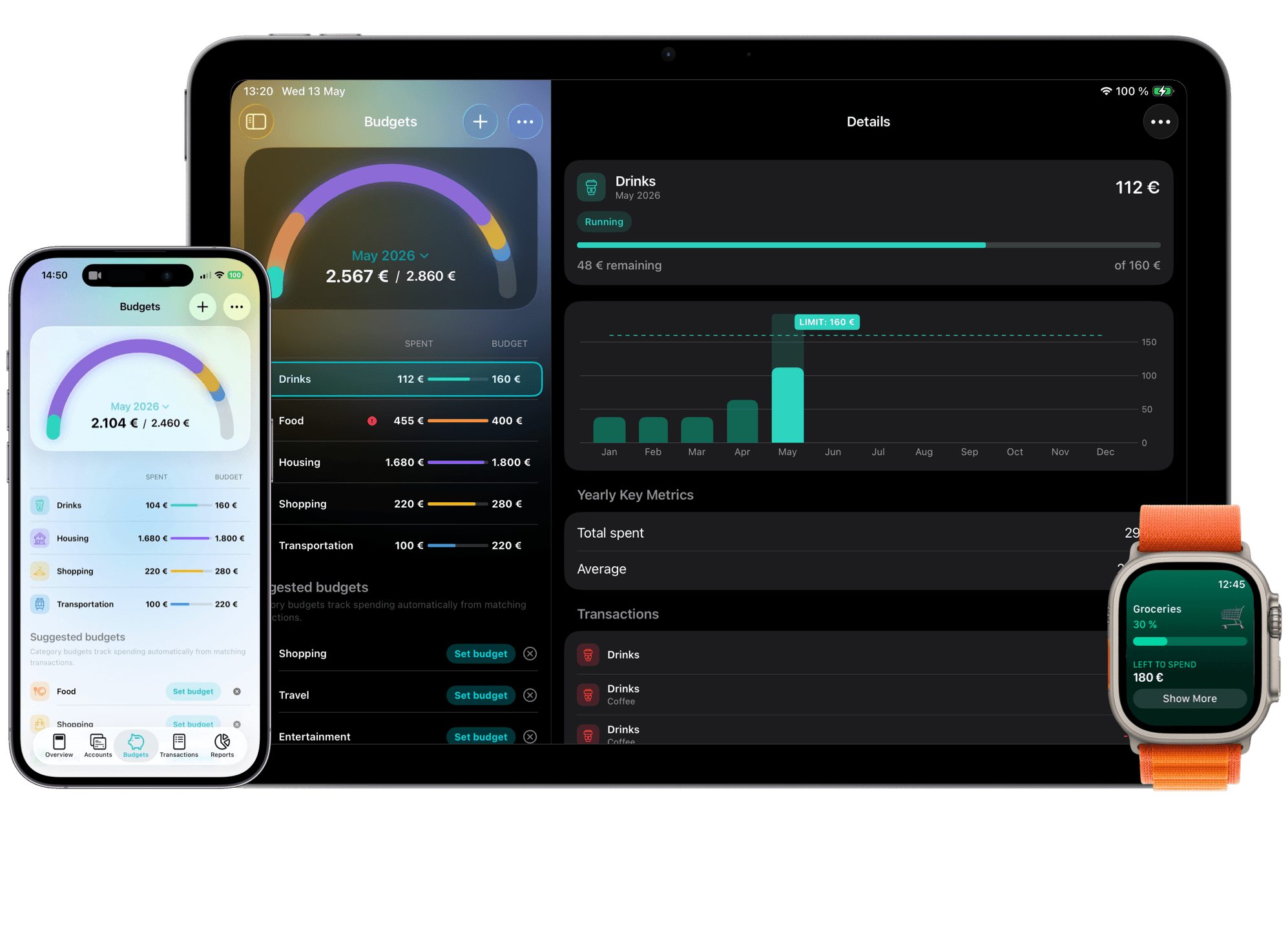
MoneyCoach helps you plan the month, then track what actually happens. Set monthly category budgets, add fixed costs, review recurring bills and subscriptions, import Apple Pay or CSV transactions when useful, and rebalance before the month gets away from you.
Start with income, fixed costs, and one category that often runs over.
App Store
featured by Apple
MoneyCoach has been featured as App of the Day, in Apple editorial placements, WWDC keynotes, and an App Store Developer Story.
Category Budgets
monthly limits
Plan the categories that decide the month.
Reports
review
See what changed after the plan met real spending.
CSV
import
Move from spreadsheets or bank exports when useful.
Short answer
MoneyCoach is a monthly budget planner app for Apple users who want a practical month-by-month plan. Start with income, fixed costs, and a few category budgets, then track spending and rebalance as real life changes.
Start with the right fit
Who should use a monthly budget planner app?
You want one monthly plan instead of scattered notes.
You need category limits that reflect real spending.
You want to review bills, subscriptions, and flexible expenses together.
You want to move from a spreadsheet into a mobile-first budget habit.
Best for
- You want a monthly budget planner that works on Apple devices.
- You need category budgets for groceries, transport, subscriptions, and bills.
- You are switching from a spreadsheet or printable template.
- You want reports and rebalancing after the plan meets real spending.
Not the best fit if
- You only want a paper worksheet.
- You never want to update or review your budget during the month.
Decision guide
Monthly budget workflow
Make the monthly plan small enough to repeat
Begin with fixed costs and three flexible categories. Once the first review is useful, add subscriptions, goals, CSV imports, or Apple Pay workflows.
Comparison
Monthly budget planner options
| Option | Best for | Tradeoff |
|---|---|---|
| MoneyCoach | Monthly planning plus real spending, reports, goals, and Apple workflows. | Best when you review categories during the month. |
| Spreadsheet | Custom annual planning and formulas. | Harder to maintain on iPhone every day. |
| Printable template | One-time planning and simple exercises. | No automatic history, reports, or reminders. |
| Bank app | Balances and recent transactions. | Usually weak for category decisions and rebalancing. |
MoneyCoach workflow
How MoneyCoach helps with monthly planning
- Create Category Budgets for monthly spending categories.
- Separate fixed costs from flexible spending.
- Use reports to compare the plan with what actually happened.
- Rebalance or top up categories when the month changes.
- Import CSV or Apple Pay Wallet transactions when manual entry is not enough.
- Use goals to keep monthly tradeoffs connected to longer-term outcomes.
When the plan should change
A monthly budget should not be frozen after day one.
If groceries, subscriptions, or transport change, rebalance before raising the whole budget.
The first month is for learning your pattern, not proving you can predict everything.
★★★★★Best of the Best
“This app by far has the easiest understanding on how it to operate and control your money and see where you can save money.”
- Papper Boy Productions, App Store review
United States
Next steps
Related MoneyCoach guides and features
Use these pages to move from research into a practical MoneyCoach setup.
Common concerns
Questions people ask before switching
Do I need bank sync?
No. You can plan with manual accounts, Apple Pay Wallet import, CSV import, or optional European bank sync depending on how much automation you want.
Can I start mid-month?
Yes. Start with the money left, the bills still coming, and the categories most likely to overspend. A partial month is enough to build the habit.
What if my income changes?
Use Category Budgets and rebalancing to adjust the month instead of rebuilding the whole plan from scratch.
Search context used for this guide
Monthly Budget Planner App FAQ
What is a monthly budget planner app?
A monthly budget planner app helps you plan income, fixed costs, category limits, bills, subscriptions, and goals for one month, then track what actually happens.
Can I use MoneyCoach as a monthly budget planner?
Yes. MoneyCoach supports monthly Category Budgets, reports, goals, manual tracking, CSV import, Apple Pay Wallet import, and optional online banking.
Can I start a monthly budget in the middle of the month?
Yes. Start with the money left, the bills still due, and the categories most likely to change before the month ends.
Is a monthly budget app better than a spreadsheet?
A spreadsheet is more flexible, but a monthly budget app is usually easier to keep updated on iPhone and better for day-to-day tracking.
Plan the month, then adjust with real spending
Create your first monthly budget in MoneyCoach with one account, a few category limits, and a weekly review that keeps the plan alive.
MoneyCoach UG, Berlin. Learn more at About Us or contact support at info@moneycoach.ai.