
MoneyCoach can track credit cards as a dedicated account type. Credit card accounts keep purchases, payments, billing cycles, due amounts, and reminders together so you can see what you owe and avoid missing payment dates.
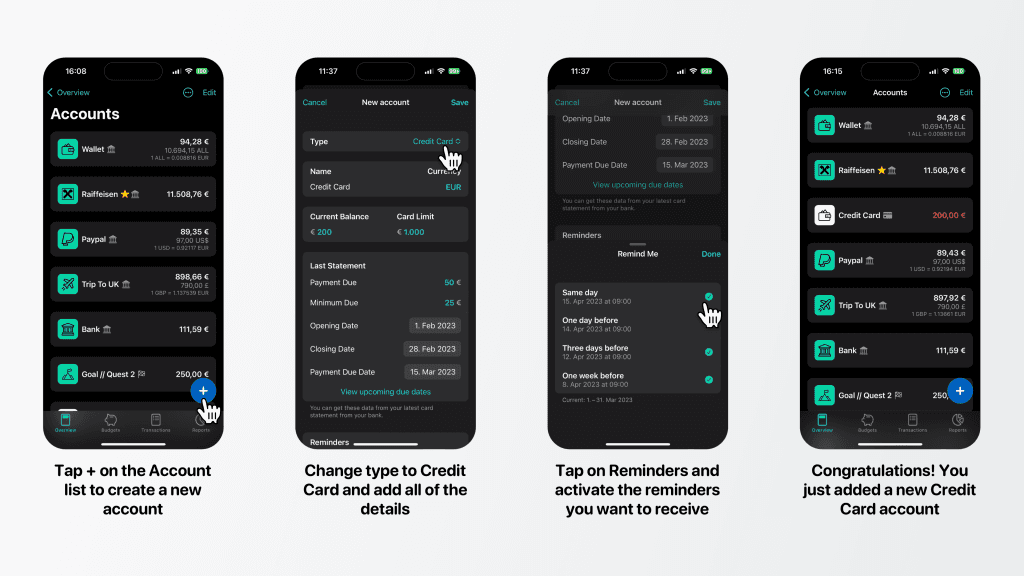
Step-by-step guide
- Open the Accounts list
- Tap the + button
- If MoneyCoach asks how you want to add an account, choose Add Manual Account
- In the account type picker, choose Credit Card
- Enter the credit card name
- Choose the card currency while creating the account
- Enter the current balance and card limit
- In Last Statement, enter Payment due and Minimum due
- Set the Opening Date and Payment Due Date for the last statement
- Tap View upcoming due dates if you want to check the generated future due dates
- Configure Reminders so MoneyCoach can notify you before payment is due
- Choose an icon and account group if needed
- Turn on Business Account only if this card belongs to your business tracking
- Tap Save
Credit Card, Savings, and Loan account types are Premium account types.
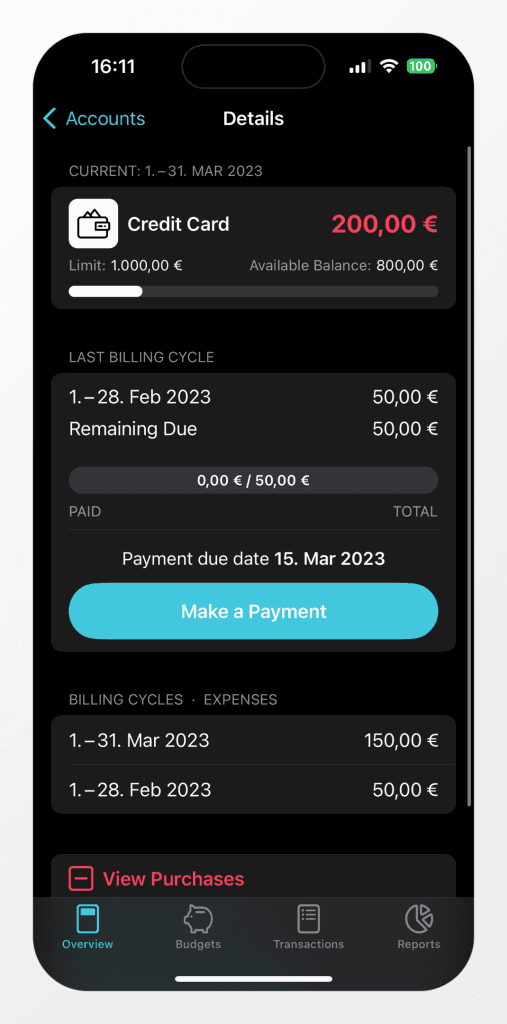
After saving the card, add purchases to it the same way you add expenses to any other account. When you open the credit card account, MoneyCoach shows a dedicated Details screen.
The top section shows the current billing cycle, the card balance, the limit, and available balance. Tapping the card opens the purchases for the current billing cycle.
Additional information
The Last Billing Cycle section shows the previous statement, the amount due, how much has been paid, what is still remaining, and the payment due date. Tapping the payment button opens a transfer flow so you can record the real payment from your checking account to the credit card account.
The Billing Cycles · Expenses section lists statement periods and the expense total for each cycle.
The buttons in the details screen let you open View purchases, View payments, or View all transactions for the card.
By keeping purchases and payments on the credit card account and setting reminders, you can track the balance and avoid missing repayment dates.